Tutorial Video
How to Deposit Funds into Your Account
Step 1
Deposit Options
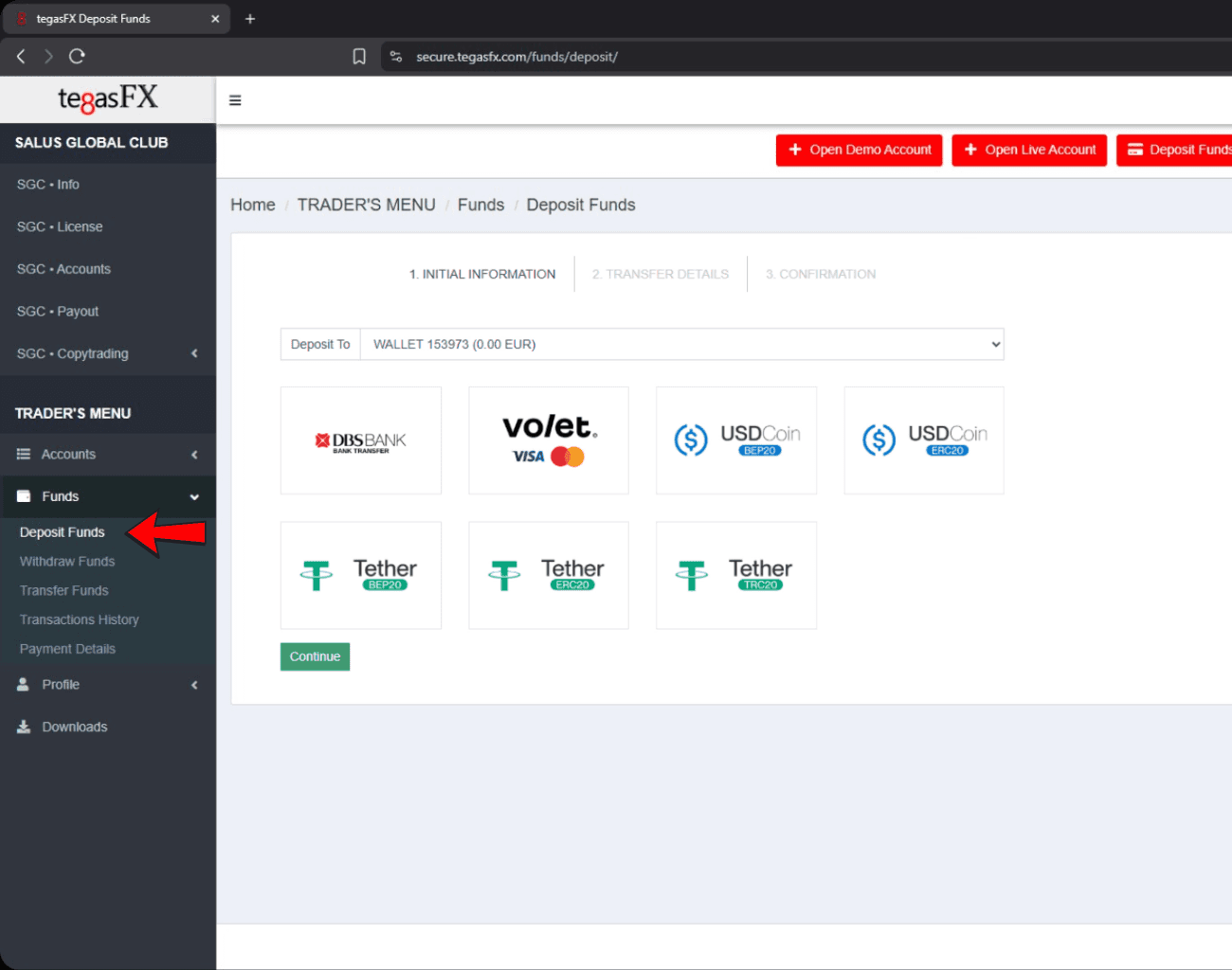
Go to Funds → Deposit in the menu. Select the wallet you want to fund (USD). You have the following deposit options:
1️⃣Bank Transfer
2️⃣Credit Card
3️⃣CryptocurrencyAttention!
Important Note:
There are several ways to make a deposit.
The most recommended methods are bank transfer and crypto deposit — they are fast, secure, and have the lowest fees.Credit card payments are also possible but usually come with higher fees, so we recommend using this method only if no other option is available.
Ideally, deposit enough funds in one transaction to cover both your license fees and trading capital — this helps avoid duplicate payments.
Minimum Deposit Amount for Bot Activation:
Standard License: Minimum deposit of 1,099 USD
Pro License: Minimum deposit of 3,199 USD
Please make sure your account has sufficient funds before activating the trading bot to avoid any potential issues.
Step 1
Deposit Options
Go to Funds → Deposit in the menu. Select the wallet you want to fund (USD). You have the following deposit options:
1️⃣Bank Transfer
2️⃣Credit Card
3️⃣CryptocurrencyAttention!
Important Note:
There are several ways to make a deposit.
The most recommended methods are bank transfer and crypto deposit — they are fast, secure, and have the lowest fees.Credit card payments are also possible but usually come with higher fees, so we recommend using this method only if no other option is available.
Ideally, deposit enough funds in one transaction to cover both your license fees and trading capital — this helps avoid duplicate payments.
Minimum Deposit Amount for Bot Activation:
Standard License: Minimum deposit of 1,099 USD
Pro License: Minimum deposit of 3,199 USD
Please make sure your account has sufficient funds before activating the trading bot to avoid any potential issues.
Step 1
Deposit Options
Go to Funds → Deposit in the menu. Select the wallet you want to fund (USD). You have the following deposit options:
1️⃣Bank Transfer
2️⃣Credit Card
3️⃣CryptocurrencyAttention!
Important Note:
There are several ways to make a deposit.
The most recommended methods are bank transfer and crypto deposit — they are fast, secure, and have the lowest fees.Credit card payments are also possible but usually come with higher fees, so we recommend using this method only if no other option is available.
Ideally, deposit enough funds in one transaction to cover both your license fees and trading capital — this helps avoid duplicate payments.
Minimum Deposit Amount for Bot Activation:
Standard License: Minimum deposit of 1,099 USD
Pro License: Minimum deposit of 3,199 USD
Please make sure your account has sufficient funds before activating the trading bot to avoid any potential issues.
Step 1
Deposit Options
Go to Funds → Deposit in the menu. Select the wallet you want to fund (USD). You have the following deposit options:
1️⃣Bank Transfer
2️⃣Credit Card
3️⃣CryptocurrencyAttention!
Important Note:
There are several ways to make a deposit.
The most recommended methods are bank transfer and crypto deposit — they are fast, secure, and have the lowest fees.Credit card payments are also possible but usually come with higher fees, so we recommend using this method only if no other option is available.
Ideally, deposit enough funds in one transaction to cover both your license fees and trading capital — this helps avoid duplicate payments.
Minimum Deposit Amount for Bot Activation:
Standard License: Minimum deposit of 1,099 USD
Pro License: Minimum deposit of 3,199 USD
Please make sure your account has sufficient funds before activating the trading bot to avoid any potential issues.
Step 2
Bank Transfer
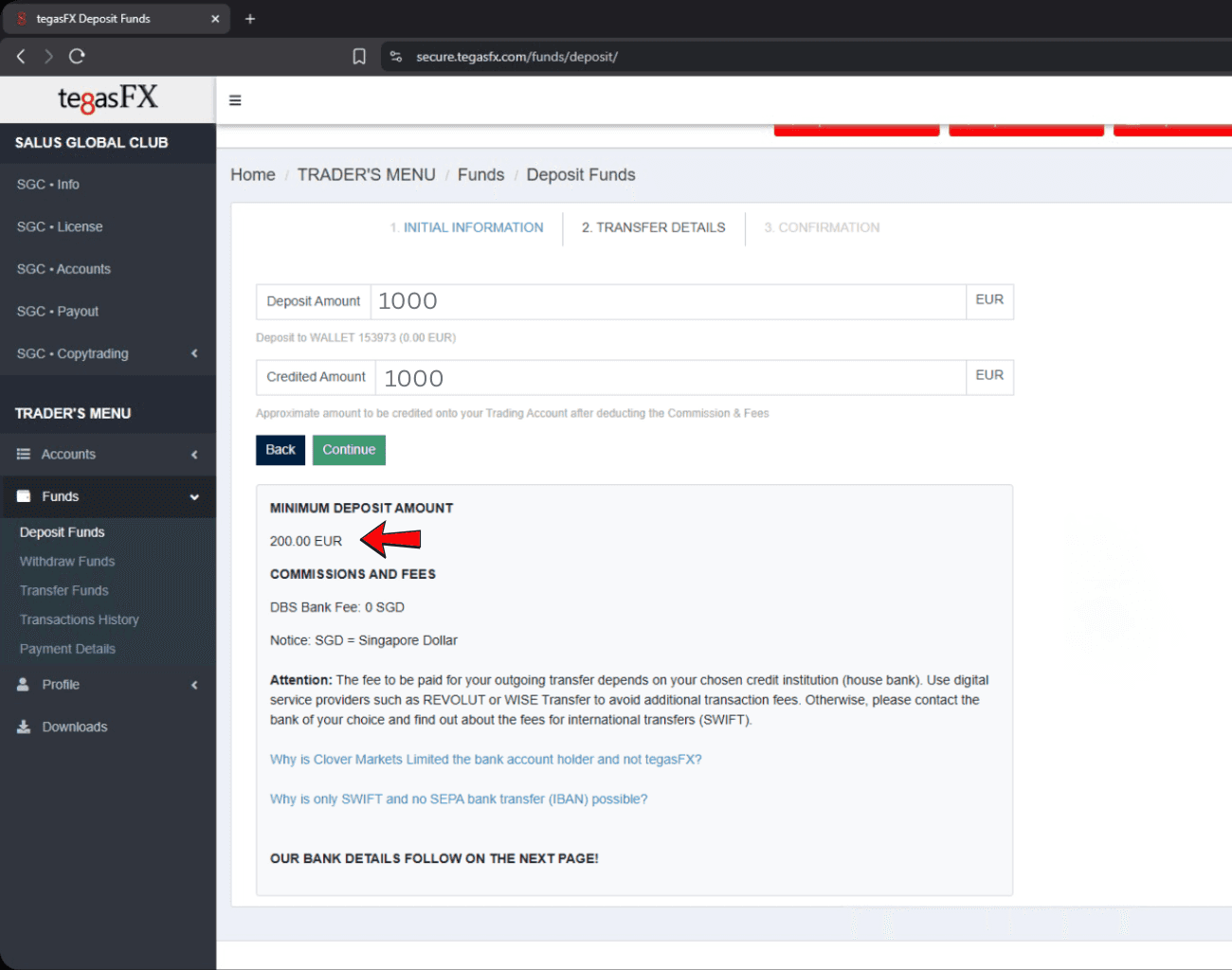
1️⃣ Enter your desired amount. The minimum deposit
amount is €200.
Important Note:
Since this is a SWIFT transfer, no IBAN is required or provided.
Always make sure to use the SWIFT code instead.Step 2
Bank Details and Recipient Information
Bank Details:
Bank Name: DBS Bank
Account Holder: Clover Markets Limited
Account Number: 0039417586
SWIFT Code: DBSSSGSG (enter without spaces or hyphens)
Bank Address: 12 Marina Boulevard, DBS Asia Central, Marina Bay Financial Centre Tower 3, Singapore 018982Recipient Information:
Account Holder: Clover Markets Limited
Company Address: Pot 805103 Rue D'Auvergne, Port Vila
Country: Singapore⚠️ Important:
Always include your TegasFX Account Number or Wallet ID as the payment reference to ensure correct allocation.
Processing time: up to 4 hours after license purchase.If using Revolut:
Transfer is made in Singapore Dollars (SGD).
Use a currency converter to determine the correct USD amount.
Enter SWIFT Code without hyphens or spaces.
Select Singapore as the destination country to avoid delays.
Funds usually arrive within 24 hours.
Step 2
Bank Transfer
1️⃣ Enter your desired amount. The minimum deposit
amount is €200.
Important Note:
Since this is a SWIFT transfer, no IBAN is required or provided.
Always make sure to use the SWIFT code instead.Step 2
Bank Details and Recipient Information
Bank Details:
Bank Name: DBS Bank
Account Holder: Clover Markets Limited
Account Number: 0039417586
SWIFT Code: DBSSSGSG (enter without spaces or hyphens)
Bank Address: 12 Marina Boulevard, DBS Asia Central, Marina Bay Financial Centre Tower 3, Singapore 018982Recipient Information:
Account Holder: Clover Markets Limited
Company Address: Pot 805103 Rue D'Auvergne, Port Vila
Country: Singapore⚠️ Important:
Always include your TegasFX Account Number or Wallet ID as the payment reference to ensure correct allocation.
Processing time: up to 4 hours after license purchase.If using Revolut:
Transfer is made in Singapore Dollars (SGD).
Use a currency converter to determine the correct USD amount.
Enter SWIFT Code without hyphens or spaces.
Select Singapore as the destination country to avoid delays.
Funds usually arrive within 24 hours.
Step 2
Bank Transfer
1️⃣ Enter your desired amount. The minimum deposit
amount is €200.
Important Note:
Since this is a SWIFT transfer, no IBAN is required or provided.
Always make sure to use the SWIFT code instead.Step 2
Bank Details and Recipient Information
Bank Details:
Bank Name: DBS Bank
Account Holder: Clover Markets Limited
Account Number: 0039417586
SWIFT Code: DBSSSGSG (enter without spaces or hyphens)
Bank Address: 12 Marina Boulevard, DBS Asia Central, Marina Bay Financial Centre Tower 3, Singapore 018982Recipient Information:
Account Holder: Clover Markets Limited
Company Address: Pot 805103 Rue D'Auvergne, Port Vila
Country: Singapore⚠️ Important:
Always include your TegasFX Account Number or Wallet ID as the payment reference to ensure correct allocation.
Processing time: up to 4 hours after license purchase.If using Revolut:
Transfer is made in Singapore Dollars (SGD).
Use a currency converter to determine the correct USD amount.
Enter SWIFT Code without hyphens or spaces.
Select Singapore as the destination country to avoid delays.
Funds usually arrive within 24 hours.
Step 2
Bank Transfer
1️⃣ Enter your desired amount. The minimum deposit
amount is €200.
Important Note:
Since this is a SWIFT transfer, no IBAN is required or provided.
Always make sure to use the SWIFT code instead.Step 2
Bank Details and Recipient Information
Bank Details:
Bank Name: DBS Bank
Account Holder: Clover Markets Limited
Account Number: 0039417586
SWIFT Code: DBSSSGSG (enter without spaces or hyphens)
Bank Address: 12 Marina Boulevard, DBS Asia Central, Marina Bay Financial Centre Tower 3, Singapore 018982Recipient Information:
Account Holder: Clover Markets Limited
Company Address: Pot 805103 Rue D'Auvergne, Port Vila
Country: Singapore⚠️ Important:
Always include your TegasFX Account Number or Wallet ID as the payment reference to ensure correct allocation.
Processing time: up to 4 hours after license purchase.If using Revolut:
Transfer is made in Singapore Dollars (SGD).
Use a currency converter to determine the correct USD amount.
Enter SWIFT Code without hyphens or spaces.
Select Singapore as the destination country to avoid delays.
Funds usually arrive within 24 hours.
Step 3
Crypto Deposit
1️⃣ Upload your private payment details, such as your BEP20 MetaMask wallet address, to verify and link your wallet for crypto deposits.
2️⃣ Enter your desired amount. The minimum deposit
amount is 20USDC/€ depends on your selected wallet.
3️⃣ Scan the QR code for direct payment, or send your deposit to the wallet address provided by TegasFX for you.Step 3
Crypto Deposit
1️⃣ Upload your private payment details, such as your BEP20 MetaMask wallet address, to verify and link your wallet for crypto deposits.
2️⃣ Enter your desired amount. The minimum deposit
amount is 20USDC/€ depends on your selected wallet.
3️⃣ Scan the QR code for direct payment, or send your deposit to the wallet address provided by TegasFX for you.Step 3
Crypto Deposit
1️⃣ Upload your private payment details, such as your BEP20 MetaMask wallet address, to verify and link your wallet for crypto deposits.
2️⃣ Enter your desired amount. The minimum deposit
amount is 20USDC/€ depends on your selected wallet.
3️⃣ Scan the QR code for direct payment, or send your deposit to the wallet address provided by TegasFX for you.Step 3
Crypto Deposit
1️⃣ Upload your private payment details, such as your BEP20 MetaMask wallet address, to verify and link your wallet for crypto deposits.
2️⃣ Enter your desired amount. The minimum deposit
amount is 20USDC/€ depends on your selected wallet.
3️⃣ Scan the QR code for direct payment, or send your deposit to the wallet address provided by TegasFX for you.
Step 4
Deposit via Address and Payment Proof
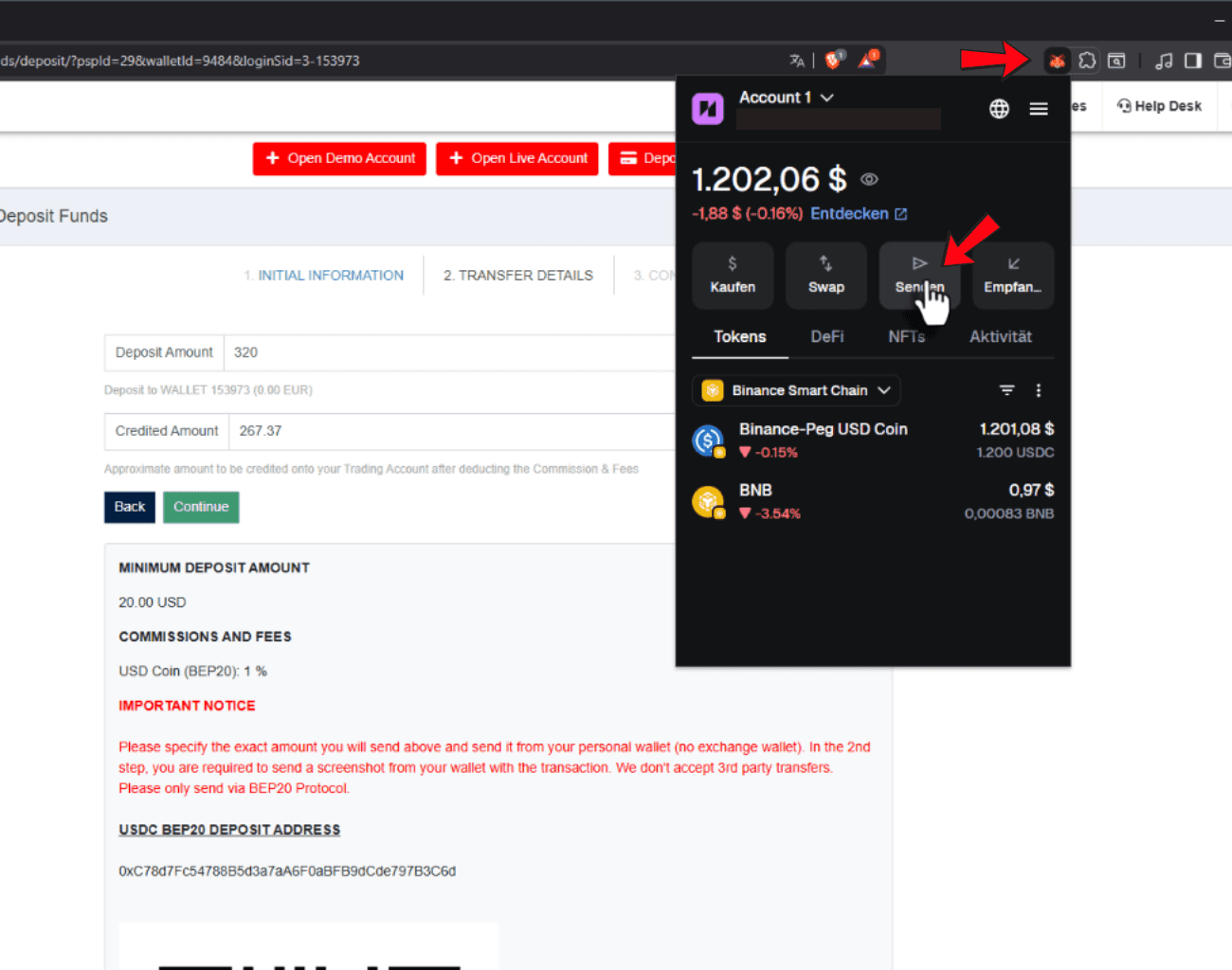
1️⃣ Copy the wallet address provided by TegasFX.
2️⃣ Send your deposit directly from your private wallet (e.g., MetaMask).
3️⃣ Select the amount in USDC that you previously entered on TegasFX, then confirm the transaction.Step 4
Deposit via Address and Payment Proof
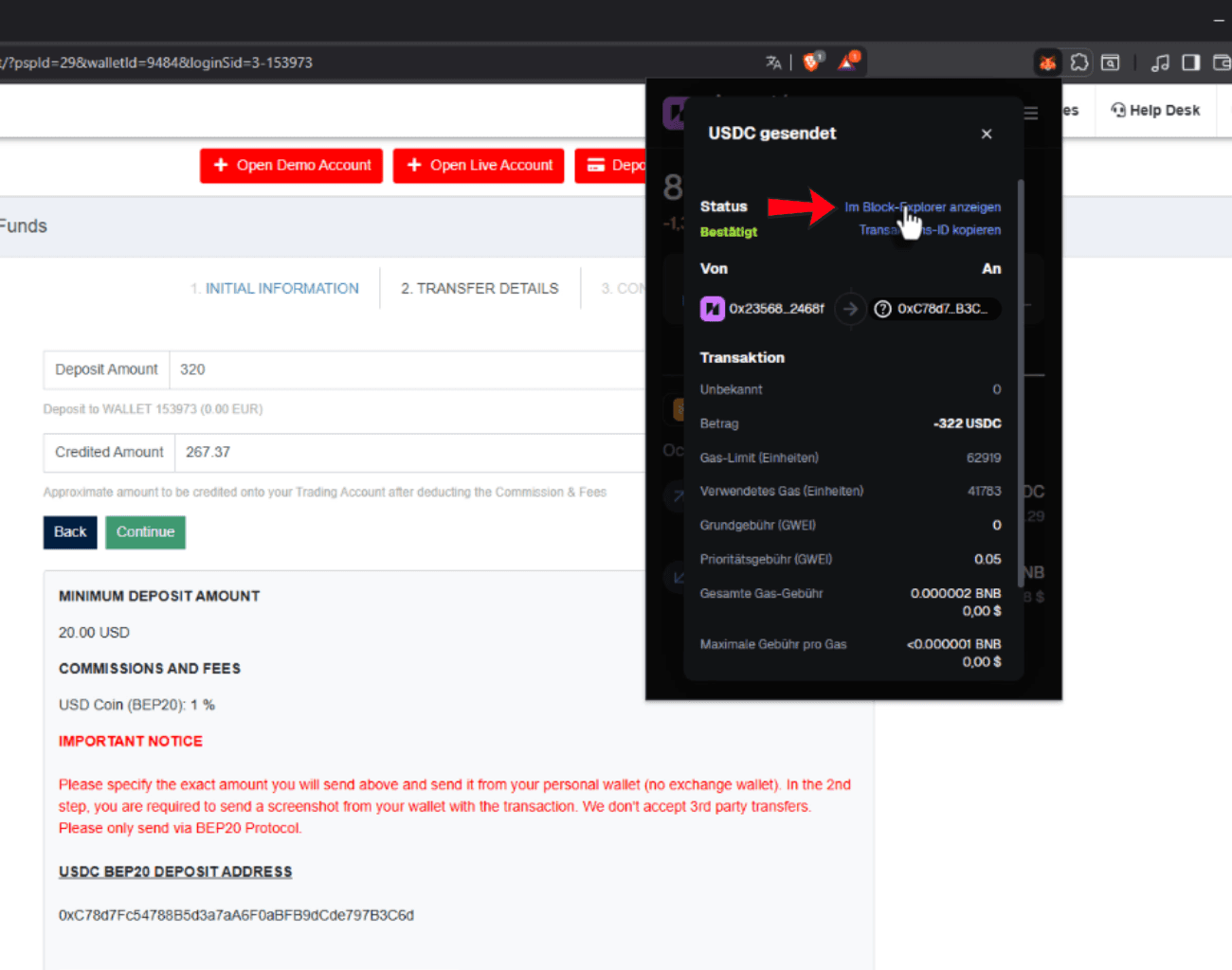
Now click on Block Explorer in your MetaMask to view the transaction details as proof of payment.
Step 4
Deposit via Address and Payment Proof
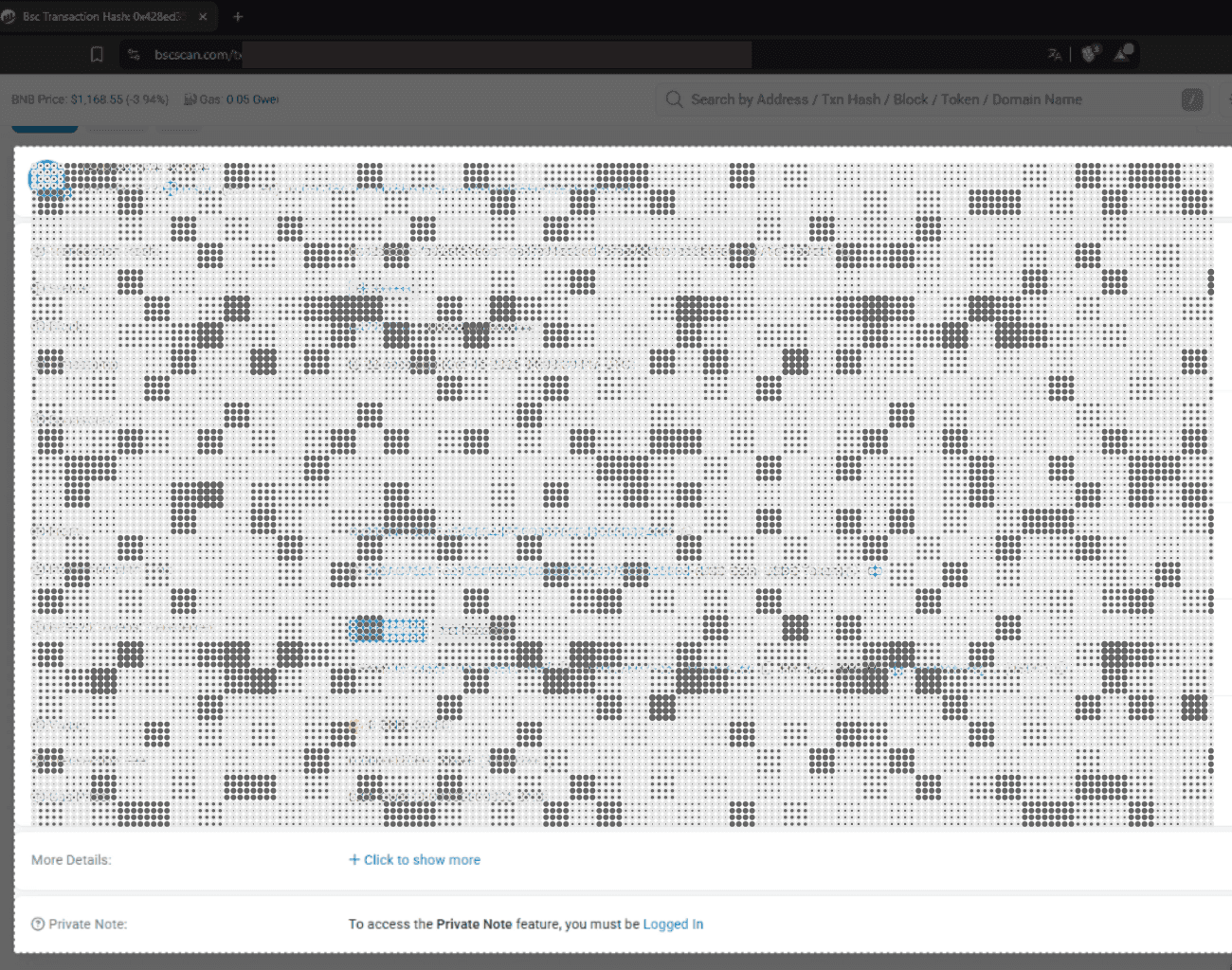
Now take a screenshot of this page and upload it as proof of payment.
After that, you’ll be notified by email from TegasFX once the deposit has been confirmed.Step 4
Deposit via Address and Payment Proof
1️⃣ Copy the wallet address provided by TegasFX.
2️⃣ Send your deposit directly from your private wallet (e.g., MetaMask).
3️⃣ Select the amount in USDC that you previously entered on TegasFX, then confirm the transaction.Step 4
Deposit via Address and Payment Proof
Now click on Block Explorer in your MetaMask to view the transaction details as proof of payment.
Step 4
Deposit via Address and Payment Proof
Now take a screenshot of this page and upload it as proof of payment.
After that, you’ll be notified by email from TegasFX once the deposit has been confirmed.Step 4
Deposit via Address and Payment Proof
1️⃣ Copy the wallet address provided by TegasFX.
2️⃣ Send your deposit directly from your private wallet (e.g., MetaMask).
3️⃣ Select the amount in USDC that you previously entered on TegasFX, then confirm the transaction.Step 4
Deposit via Address and Payment Proof
Now click on Block Explorer in your MetaMask to view the transaction details as proof of payment.
Step 4
Deposit via Address and Payment Proof
Now take a screenshot of this page and upload it as proof of payment.
After that, you’ll be notified by email from TegasFX once the deposit has been confirmed.Step 4
Deposit via Address and Payment Proof
1️⃣ Copy the wallet address provided by TegasFX.
2️⃣ Send your deposit directly from your private wallet (e.g., MetaMask).
3️⃣ Select the amount in USDC that you previously entered on TegasFX, then confirm the transaction.Step 4
Deposit via Address and Payment Proof
Now click on Block Explorer in your MetaMask to view the transaction details as proof of payment.
Step 4
Deposit via Address and Payment Proof
Now take a screenshot of this page and upload it as proof of payment.
After that, you’ll be notified by email from TegasFX once the deposit has been confirmed.